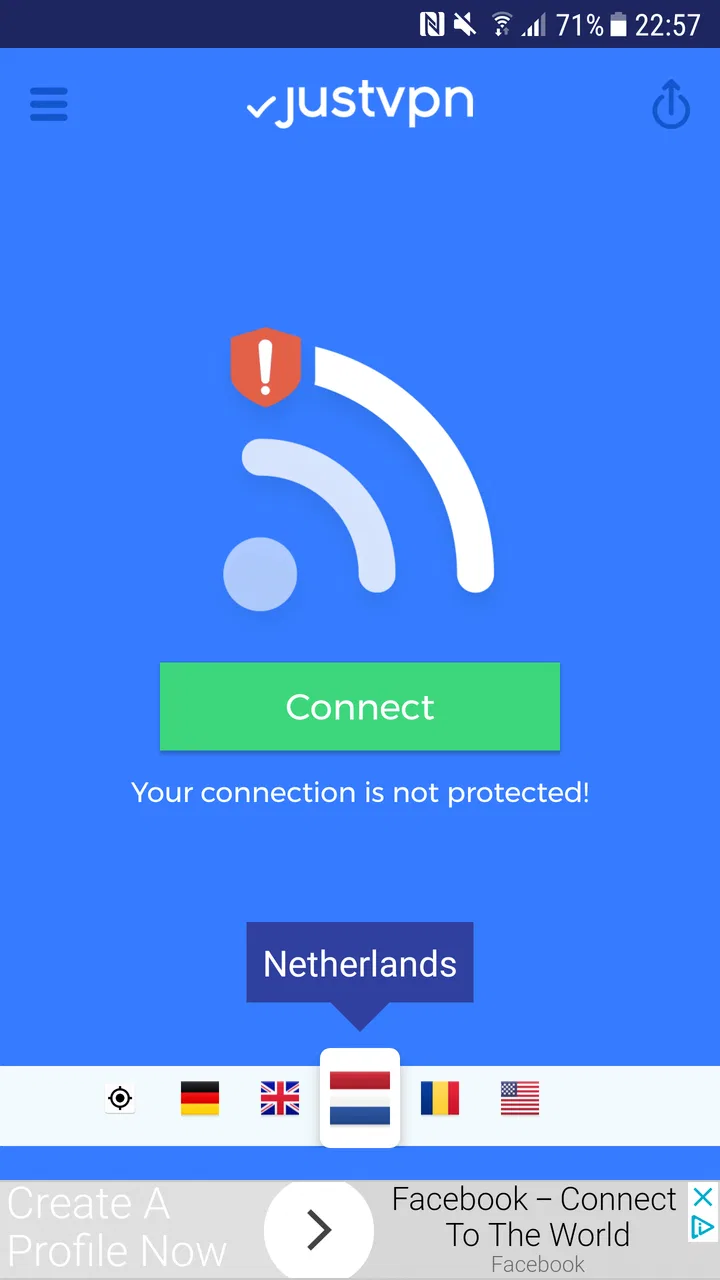
VPN high speed proxy - justvpn
- 4.4
- Rating
- 1.00M
- Installs
- Free
- Price

 Analysis by App-foxy
Using a VPN on a phone is rarely about having another app to tap when everything is working perfectly. It matters when a public network feels uncomfortable, when a page behaves differently in another region, or when a connection needs an extra layer between the device and the wider internet. I spent time with VPN high speed proxy - justvpn in those ordinary, slightly frustrating moments, and found an uncomplicated tools app that focuses on getting a proxy connection started without turning the process into a technical project.
The app comes from JustVPN Network and is free to install, although it includes in-app purchases ranging from $4.99 to $29.99 per item. It is aimed at Everyone, runs on Android 6.0 and later, and its current version is 1.9.4.2. Those details make it accessible to a wide range of Android phones, including older devices that may not handle newer, heavier utilities as comfortably. The important question, though, is not simply whether it connects. It is whether the connection remains useful when mobile conditions change.
Where connectivity makes the biggest difference
My first impression was that this is an app for people who want a straightforward route into VPN use rather than a dashboard full of specialist controls. Its store positioning points toward proxy-based browsing, anonymity, and getting around regional restrictions. In practice, that means its value depends heavily on the network underneath it. A VPN cannot rescue a phone with no usable internet connection; it adds a route to an existing connection, and that route can vary in speed and reliability.
You May Also Like

 Blood Strike: 2.5 Anniversary
Blood Strike’s Loadouts Turn Every Drop Into a Tactical Gamble
A close look at Blood Strike’s custom loadouts: how fast access to signature weapons reshapes its battle royale rhythm, rewards preparation, and narrows the gap between fights.

 Pandora - Music & Podcasts
Pandora’s Music Is Easy to Start, but Harder to Recover
Pandora’s strength is its low-effort path from a seed to a station. Its weak spot is how much confidence it asks you to place in connection, setup, and quiet recovery.

 8 Ball Pool
 Is Built on Rivalries, Rematches, and Routine
A close look at the rivalries, rematches, shared routines, and unanswered safety questions that turn a quick pool match into a persistent mobile community.

 Samsung Music
’s Quiet Strength Is Playing What You Already Own
Its reach comes less from spectacle than from dependable access to a personal library. That simplicity is both the app’s strongest retention engine and its ceiling.

 AccuWeather: Weather Radar
AccuWeather Review: A Quick, Clear Forecast for Everyday Decisions
For everyday plans, the best forecast is the one you can understand quickly. AccuWeather makes rain timing, radar, and local conditions easy to act on, with a few trade-offs.

 Hill Climb Racing
Why Hill Climb Racing Still Turns Crashes Into One More Run
A tiny car, a bumpy hill and one more upgrade: Hill Climb Racing keeps resurfacing because its simple chaos makes every near-miss feel personal.
More From Our News Desk



A realistic example is a coffee shop or airport lounge. I would normally connect to the available Wi-Fi, open the VPN app, and establish the protected connection before browsing accounts, reading messages, or checking travel information. The useful habit here is sequencing: connect to Wi-Fi first, wait until the phone has a stable internet path, then start justvpn. Launching a VPN while the underlying network is still negotiating can make a simple connection feel like an app problem when the real issue is the hotspot.
That same pattern applies to hotel networks. Some captive portals require a browser sign-in before other apps can reach the internet. If justvpn is started too early, the portal may not appear normally, leaving the impression that the VPN is stuck. I found it more practical to complete the venue’s Wi-Fi login first, confirm that an ordinary webpage loads, and only then activate the proxy. This small workflow is more valuable than it sounds because it prevents repeated reconnect attempts and avoids blaming the wrong layer of the connection.
The app is also relevant when a website or service displays different content based on location. A proxy can change the apparent route, but that does not guarantee that every service will accept it. Some sites identify proxy traffic, some require an account region to match the connection, and some simply load more slowly through a distant route. I would treat justvpn as a useful access tool, not as a universal key for every regional restriction.
What the connection feels like during normal browsing
For light browsing, the extra step is usually easy to accept. Text pages, searches, and routine reading do not demand the same consistency as a video call or a large download. The experience becomes more sensitive when a page contains many images, when several apps are refreshing in the background, or when the original mobile signal is already weak. In those situations, the VPN route adds another possible point of delay.
This is where the word “high speed” in the app’s name needs a practical interpretation. I would not read it as a promise that every server or every network will be fast. Speed is shaped by the phone’s signal, the Wi-Fi connection, congestion, distance, and the service being accessed. A nearby, stable network can make the app feel unobtrusive; a crowded public hotspot can make the same app feel much less responsive. The honest benefit is convenience, not a guaranteed performance level.
One useful test is to compare the same task before and after connecting. Open a page you use regularly, notice whether images and interactive elements respond normally, and then decide whether the VPN is helping enough to keep enabled. This is especially sensible for location-sensitive browsing, where a slightly slower connection may be an acceptable trade-off, but less sensible for activities that depend on immediate responses.
Why mobile situations expose the trade-offs
Phones move constantly between networks, and that is where a VPN app can become less predictable than it appears on a desk. Walking out of Wi-Fi coverage, switching from one hotspot to another, entering a lift, or moving through an area with weak cellular service can interrupt the underlying connection. The VPN may then need to reconnect, while the app you were using may already have timed out.
I recommend treating a network change as a fresh session rather than assuming the previous connection is still valid. After moving from Wi-Fi to mobile data, I would check whether the VPN indicator remains active and test a simple webpage before opening anything important. If a page refuses to load, disconnecting and reconnecting once is more sensible than repeatedly refreshing the page inside the affected app.
This matters for people who use justvpn while commuting. A short browsing session at a station may work well, but the connection can change several times during a journey. If the main goal is uninterrupted audio, live navigation, or a work call, a VPN proxy may introduce more variables than the task can tolerate. For those uses, I would first prioritize a stable direct connection and activate the VPN when privacy or regional access is more important than continuity.
On the other hand, mobile users who regularly switch between public Wi-Fi networks may appreciate having one familiar tool instead of changing settings manually for each network. The app’s broad device compatibility helps here. Since it supports Android 6.0 and later, it can fit into an older phone setup where newer privacy tools may not be available or may feel unnecessarily demanding.
Failure, recovery, and knowing when to stop retrying
A useful VPN review should discuss what happens when the connection fails, because that is when the difference between a practical tool and a frustrating one becomes clear. With justvpn, I would approach failure in layers. First, check whether the phone itself can reach the internet without the VPN. If ordinary browsing fails, switching VPN routes will not solve the underlying problem. If the direct connection works, then disconnecting and starting a new VPN session is the next reasonable step.
Repeated retries are not always productive. A proxy route can be temporarily busy, or the network may be filtering VPN traffic. In either case, tapping connect again and again can waste time while the original issue remains. My preferred recovery routine is simple: stop the current attempt, verify the Wi-Fi or mobile signal, reconnect once, and test with a lightweight webpage. If the result is still poor, I would temporarily return to the direct connection for low-risk browsing rather than letting the failed VPN block every task.
There is also a difference between a failed connection and a slow connection. A page that eventually opens may indicate congestion rather than a complete outage. For reading, that might be acceptable. For an interactive service, it may not be. I would avoid making an important decision based only on the app’s successful connection status; the real test is whether the particular website or app you need behaves normally afterward.
Another recovery habit is to close the loop after finishing. If I no longer need the VPN, I would disconnect it instead of leaving the session running through a long period of network changes. This can reduce confusion when a later app behaves differently or when a phone moves from Wi-Fi to cellular service. It also makes troubleshooting easier because I know whether the VPN is part of the current connection path.
Privacy expectations need a careful boundary
justvpn is designed around anonymous browsing and proxy access, but I would not treat a VPN as complete personal security. It can change how traffic is routed, yet it does not make unsafe websites safe, remove the need for strong passwords, or protect an account if the account itself is compromised. I would still look for secure website connections, avoid entering sensitive information into unfamiliar pages, and keep the phone’s operating system and apps maintained.
The app is therefore best understood as one layer in a broader routine. Its strongest everyday role is reducing exposure on networks I do not fully trust and helping me test whether a different route improves access. It is not a substitute for careful browsing, and I would be cautious about using any VPN for highly sensitive work without first understanding the provider’s privacy practices and the connection behavior in that specific situation.
Using it without wasting mobile data
A VPN does not remove the data consumed by browsing. If anything, the extra routing can make data use slightly less predictable, especially when pages retry, images reload, or an app reconnects after a network change. I would not activate justvpn automatically for every background task on a limited mobile plan. Instead, I would reserve it for the situations where the privacy or access benefit is worth the additional connection overhead.
A practical approach is to use the VPN for short, deliberate sessions on public Wi-Fi, then disconnect when returning to trusted home connectivity. On mobile data, I would be more selective with image-heavy sites, streaming, and large downloads. The app can help with the route, but it cannot make a limited data allowance unlimited in the everyday sense. The word “unlimited” in a VPN description should not be confused with unlimited cellular data or unlimited access to every online service.
Background behavior is another reason to pay attention. If a VPN remains active while several apps synchronize, the phone may continue sending traffic through it even when I am not actively browsing. I would check which apps are working in the background and avoid leaving a VPN session on simply out of habit. This is particularly helpful on older phones, where a constantly changing network path can make battery and connection behavior feel less consistent.
For travelers, the best workflow depends on the source of the connection. On hotel Wi-Fi, I would authenticate with the hotel portal first, activate justvpn for browsing, and disconnect it before changing rooms or networks if the connection becomes unstable. On a roaming cellular plan, I would use it for targeted tasks and keep an eye on the phone’s normal data controls. That combination gives the app a clear job instead of asking it to manage every connection continuously.
Who will appreciate the simple approach
I think this app suits Android users who want a free starting point for VPN-based browsing, particularly those using older compatible phones or moving between public networks. It also makes sense for someone who does not want to learn server terminology before trying a proxy connection. The broad audience is reflected in its Everyone age rating, while its popularity is visible in a 4.4 average from around 25 thousand ratings and over 1 million installs.
The free entry point is helpful for testing whether this type of connection fits into a personal routine. I would use the free experience to judge three things: whether it connects reliably on the networks I actually use, whether the speed is acceptable for my normal browsing, and whether the route works with the services I care about. Only after that would I consider an in-app purchase. The available purchases, from $4.99 to $29.99 per item, make it important to understand what additional value is being offered before paying.
I would skip it if my main requirement is a highly predictable connection for professional video meetings, competitive online play, or constant high-bandwidth activity. Those tasks are sensitive to latency and interruptions, and a general proxy app may not be the best fit. I would also look elsewhere if I needed extensive configuration, detailed connection diagnostics, or a clearly documented enterprise-style setup. A more specialized VPN service may justify its cost in those cases.
Compared with manually changing network settings, justvpn is more approachable because it puts the connection step into a dedicated mobile workflow. Compared with premium VPN products, its appeal is the low barrier to entry rather than a long list of advanced controls. That trade-off is reasonable for casual privacy and access needs, but less convincing for users who want deep control over routing, protocols, or device-wide policy.
My connectivity verdict after using it in real routines
VPN high speed proxy - justvpn works best when I give it a specific, limited task: protect browsing on an unfamiliar Wi-Fi network, test whether a different route improves access, or add convenience when a location-based page is not behaving as expected. Its value is less about making every connection faster and more about making VPN use easy enough to include in a normal phone routine.
The app’s main strength is its accessible starting point. It is free to try, supports Android 6.0 and later, and comes from JustVPN Network with a current version of 1.9.4.2. The main friction is equally clear: the result depends on the quality of the underlying network, mobile transitions can interrupt a session, and a proxy should not be mistaken for total online protection. Those are not reasons to dismiss it; they are reasons to use it deliberately.
My recommendation is conditional but positive. If you want a simple Android tool for occasional VPN browsing and you are willing to check the connection after switching networks, justvpn is worth trying. Start with low-stakes browsing, learn how it behaves on your usual Wi-Fi and mobile connection, and disconnect it when it is no longer needed. If your priority is advanced control, guaranteed consistency, or demanding real-time performance, choose a more specialized alternative instead. For everyday mobile privacy, the best result comes from treating justvpn as a useful connection layer, not as a cure for every network problem.
FAQs for VPN high speed proxy - justvpn
01What platforms support VPN High Speed Proxy - JustVPN?
VPN High Speed Proxy - JustVPN is available on both Android and iOS platforms. It can be downloaded from the Google Play Store and Apple App Store respectively. The app is designed to work seamlessly on smartphones and tablets, providing users with a secure and private browsing experience across devices.
02Does JustVPN offer unlimited bandwidth and server switching?
Yes, JustVPN provides users with unlimited bandwidth, allowing you to stream, browse, and download without worrying about data caps. Additionally, the app supports unlimited server switching, enabling users to choose from a variety of global servers to find the best connection for their needs without any restrictions.
03Is JustVPN safe and secure for protecting my online privacy?
JustVPN prioritizes user privacy and security with robust encryption technologies, ensuring your internet traffic is securely routed through their servers. It masks your IP address, making your online activities anonymous. However, users are encouraged to review JustVPN's privacy policy to understand how their data is managed.
04Does JustVPN impact internet speed or performance?
While any VPN can potentially affect your internet speed due to encryption processes, JustVPN is optimized for high-speed performance. It aims to minimize speed reductions by offering a range of fast servers. For best results, users should select servers close to their physical location or those marked as high-speed.
05Is there customer support available for JustVPN users?
JustVPN provides customer support to assist users with any queries or technical issues. Support is typically available through in-app contact options or via their official website. Users can expect responsive support aimed at resolving any issues promptly, enhancing their overall experience with the app.
Pros
- Fast connection speeds ensure smooth browsing.
- User-friendly interface for easy navigation.
- Multiple server locations for global access.
- No registration required for quick setup.
- Strong encryption enhances online security.
Cons
- Limited free version with fewer features.
- Occasional connection drops in some regions.
- Ads can be intrusive in the free version.
- Lacks advanced settings for experienced users.
- Customer support response can be slow.

VPN high speed proxy - justvpn
Gallery